Here’s how to execute a SQL Server Stored Procedure using SQLCMD. For demonstration purposes, I will be executing the ‘CustOrderHist’ Stored Procedure in the Northwind database. This procedure accepts the CustomerID and returns a list of orders placed by the Customer.
Open your Command Prompt. I have a named instance and use Windows Authentication, so I will be connecting to SQL Server using the following statement:
sqlcmd -S <ComputerName>\<InstanceName>
In my case, it is: sqlcmd -S SUPROTIM-PC\SUPROTIM2
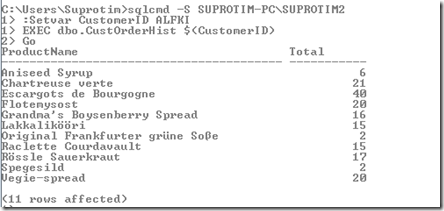
Now enter the following commands:
:Setvar CustomerID ALFKI
EXEC dbo.CustOrderHist $(CustomerID)
Go
The output is as shown below:
About The Author
Suprotim Agarwal, MCSD, MCAD, MCDBA, MCSE, is the founder of
DotNetCurry,
DNC Magazine for Developers,
SQLServerCurry and
DevCurry. He has also authored a couple of books
51 Recipes using jQuery with ASP.NET Controls and a new one recently at
The Absolutely Awesome jQuery CookBook.
Suprotim has received the prestigous Microsoft MVP award for nine times in a row now. In a professional capacity, he is the CEO of A2Z Knowledge Visuals Pvt Ltd, a digital group that represents premium web sites and digital publications comprising of Professional web, windows, mobile and cloud developers, technical managers, and architects.
Get in touch with him on Twitter @suprotimagarwal, LinkedIn or befriend him on Facebook


2 comments:
but, if you have more than a database
?
How can i print the list of databases in my current instance using SQLCMD?
Post a Comment