When there are too many columns referenced in a query, it becomes difficult to track the datatype of each column referenced in that query. In such cases, SSMS 2008 offers a very handy feature using which you can determine the datatype and nullability of a column without going to the Object Explorer.
This feature is called the ‘Quick Info’ feature and if not already enabled on your machine, this feature can be enabled using Edit > Intellisense > Quick Info

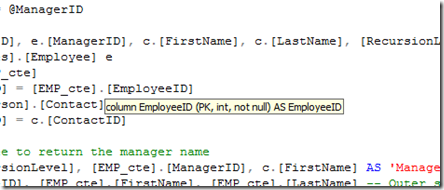
Once enabled, you can then hover your mouse over a column in a query to see it’s datatype and nullability as shown below. Here we are viewing the datatype and nullability of the EmployeeID column.
About The Author
Suprotim Agarwal, MCSD, MCAD, MCDBA, MCSE, is the founder of
DotNetCurry,
DNC Magazine for Developers,
SQLServerCurry and
DevCurry. He has also authored a couple of books
51 Recipes using jQuery with ASP.NET Controls and a new one recently at
The Absolutely Awesome jQuery CookBook.
Suprotim has received the prestigous Microsoft MVP award for nine times in a row now. In a professional capacity, he is the CEO of A2Z Knowledge Visuals Pvt Ltd, a digital group that represents premium web sites and digital publications comprising of Professional web, windows, mobile and cloud developers, technical managers, and architects.
Get in touch with him on Twitter @suprotimagarwal, LinkedIn or befriend him on Facebook


No comments:
Post a Comment