Here are 3 different ways to display VIEW definitions:
Method 1: Use sp_helptext
USE Northwind
GO
EXEC sp_helptext Invoices
Method 2: Use SQL Server 2008 Management Studio
Open SSMS 2008. Choose the database and expand the ‘Views’ node. Right click on it > Script View as > CREATE To > Choose different options as shown below:

Method 3: If you want to display the name and definitions of all view in a database, use this query:
SELECT TABLE_NAME as ViewName,
VIEW_DEFINITION as ViewDefinition
FROM INFORMATION_SCHEMA.Views
OUTPUT
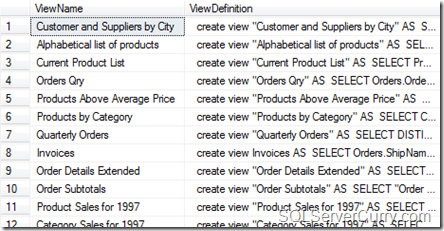
Alternatively, you can also do a join between sys.views and sys.sql_modules to obtain the same result
About The Author
Suprotim Agarwal, MCSD, MCAD, MCDBA, MCSE, is the founder of
DotNetCurry,
DNC Magazine for Developers,
SQLServerCurry and
DevCurry. He has also authored a couple of books
51 Recipes using jQuery with ASP.NET Controls and a new one recently at
The Absolutely Awesome jQuery CookBook.
Suprotim has received the prestigous Microsoft MVP award for nine times in a row now. In a professional capacity, he is the CEO of A2Z Knowledge Visuals Pvt Ltd, a digital group that represents premium web sites and digital publications comprising of Professional web, windows, mobile and cloud developers, technical managers, and architects.
Get in touch with him on Twitter @suprotimagarwal, LinkedIn or befriend him on Facebook


9 comments:
Note that information_schema.views will show you only 4000 characters
Other reliable methods are
1
select object_definition(object_id) from sys.objects
where type='v'
2
select * from sys.[sql_modules]
where definition like 'CREATE VIEW%'
Madhivanan
http://beyondrelational.com/blogs/madhivanan
Thanks Madhivannan. As mentioned in my post, making a JOIN (using objectid) between sys.views and sys.sql_modules will get the View Name and View Definition
Thank you Madhivaan and Suprotim for sharing your solutions. This is very useful as I used to manually check views from management studio. Knowledge does wonders!
Thanks guys, very useful posts!!
Very useful post. Keep up the good work guys... :)
A very handy post....!!
Thank you, this helped a lot!
Here is how i do it:
SELECT OBJECT_DEFINITION (OBJECT_ID(N'VIEW_NAME'));
Post a Comment