For those new to SQL Server 2008, when you perform operations like Adding/Dropping a column or changing the data type of the column in the Management Studio, a warning pops up:
"Saving changes is not permitted. The changes you have made require the following tables to be dropped and re-created. You have either made changes to a table that can't be re-created or enabled the option Prevent saving changes that require the table to be re-created." Solution:
In order to prevent this warning from occuring, Go to Tools > Options > Designers > Table and Database Designers > Uncheck the checkbox 'Prevent saving changes that require the table to be re-created check box'
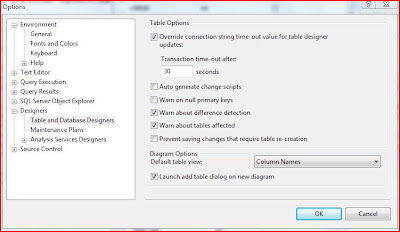
Now you will be able to make changes to the tables.
About The Author
Suprotim Agarwal, MCSD, MCAD, MCDBA, MCSE, is the founder of
DotNetCurry,
DNC Magazine for Developers,
SQLServerCurry and
DevCurry. He has also authored a couple of books
51 Recipes using jQuery with ASP.NET Controls and a new one recently at
The Absolutely Awesome jQuery CookBook.
Suprotim has received the prestigous Microsoft MVP award for nine times in a row now. In a professional capacity, he is the CEO of A2Z Knowledge Visuals Pvt Ltd, a digital group that represents premium web sites and digital publications comprising of Professional web, windows, mobile and cloud developers, technical managers, and architects.
Get in touch with him on Twitter @suprotimagarwal, LinkedIn or befriend him on Facebook


2 comments:
Tnx for sharing!
Thanks for the info. I wonder what is the rationale behind that new option?
Post a Comment