Every .NET Developer Should Know About the Database they are working with

I am a strong believer that a Developer should understand the databases and network he/she is interacting with. As a .NET Developer, having TSQL and SQL Server Administration knowledge to some degree of depth, really helps to design and develop your applications as well as communicate with the DBAs and admins you work with. A lot of us have testing and staging environments and being able to manage those environments, saves the organization on some resources.

Also with the economies changing rapidly, many developer positions require you to have knowledge about querying and managing databases. Flexibility and the ability to learn and understand the application and it’s components differentiates a good developer from the others and keeps you ahead in the race. Although BI is an essential part of an application, in this article, I will focus on the administration of a database.

In this article, I have attempted to list some articles we have written in the past that will give you information about handling a SQL Server 2005/2008 database. Hope you like them!

Please retweet and share this post with fellow developers. Thanks!


Identifying SQL Server Bottlenecks and Performance Issues

SQL Server: Identify Memory and Performance Issues in T-SQL Queries and Fix them - Sometimes you may notice that some T-SQL queries are taking too much time to execute and thus slowing down the performance of SQL Server and other applications. You can find and rectify these queries using the following methods shown in this article

Find the Most Time Consuming Code in your SQL Server Database - This post will demonstrate how to find T-SQL code (SQL Server 2005/2008) that takes the most time to execute.

Monitor Running Processes in SQL Server 2005/2008 - You often need to monitor the processes running on the server in order to improve the performance, by tuning them. A common option is to make use of a profiler. But in SQL Server versions starting 2005, we can also use dynamic management views.

SQL Server: Monitor Long SQL Agent Jobs - In SQL Server, there are various jobs running on the server, each solving a different purpose. Sometimes these jobs run for a long time. The best way to identify and monitor these long running jobs is to make use of a profiler.

Important DMVs to monitor CPU – SQL Server - Dynamic Management Views (DMVs) can be very useful to diagnose and troubleshoot common performance problems in SQL Server. Here are some important Dynamic Management Views (DMV’s) to monitor the CPU where SQL Server is installed.

Monitor Activities on your SQL Server 2005/2008 - Have you heard about or used SQL Server MVP Adam Mechanics Who is Active This is a must have script for DBA’s and if you have been using sp_who or sp_who2, then you will love it.

List of Database Engine Error Messages - All system and user-defined error messages in an instance of the Database Engine are contained in the sys.messages catalog view. Here’s how to query this catalog view to list the Error Messages based on their severity

Moving Data in SQL Server

Move Data to a Different Table using OUTPUT clause – Shows how to move some data from one table to another table and then delete the data from source table.

SQL Server: Transfer Objects From One Schema to Another - This post describes how to transfer objects from one schema to another

Transfer Logins from SQL Server 2005 to SQL Server 2008 - When you want to move a database from one server to another, you can take a backup of the database and restore into the other server. However this will not transfers the logins from one SQL server to another, say SQL Server 2005 to SQL Server 2008. This post shows the right way to do it.

SQL Server: Export Table to CSV - Exporting data from SQL Server to a .csv file is often needed to use that data into a different system. There are two easy ways to do this – using BCP and using SQL Server Management Studio.

Load Comma Delimited file (csv) in SQL Server - We often need to import data that comes from different data sources, into a database like SQL Server. Usually data comes in the form of a comma delimited file aka CSV file.

SQL Server Migration Assistant v5.0 - Microsoft recently announced the release of SQL Server Migration Assistant (SSMA) v5.0, a tool to further simplify the user experience in automating the migration of Oracle, Sybase, MySQL and Microsoft Access databases to SQL server or SQL Azure

SQL Server: Move Table to a new File Group - If a database is expected to grow rapidly, it becomes challenging to maintain the data files in the same location/drive. To manage disk space well, it one solution to this problem is to identify large tables and accordingly move new data to a new File group, which can be mapped to a different drive path. This article shows how to move a SQL Server Table from one File group to another.

Know your SQL Server Objects and Manipulate them

SQL Server Management Objects 2008 (SMO) New Features - In this article we will practically explore some features of SQL Server Management Objects.

Filtered Index Vs Indexed Views in SQL Server 2008 - In this article I have listed some differences between Filtered Index and Indexed View that will help understand the differences between the two.

View Index MetaData – SQL Server - The sp_helpindex stored procedure gives useful information like name, description and key about the indexes on a table or view. However for retrieving detailed information, you should make use of the sys.indexes object catalog view.

Change an Existing Index in SQL Server - With SQL Server, you can use the DROP_EXISTING clause to rebuild the index, add or drop columns, modify options, modify column sort order, or change the partition scheme or filegroup. Let us see how to rebuild the index and then add a column to an existing index

Find the Most Used Stored Procedures in SQL Server – This post uses the sys.dm_exec_query_stats DMV to return the 3 most used stored procedures in your SQL Server database

Useful SQL Server System Stored Procedures You Should Know - System Stored Procedures are useful in performing administrative and informational activities in SQL Server. Here’s a bunch of System Stored Procedures that are used on a frequent basis (in no particular order).

Find the Missing Identity Numbers in SQL Server 2005/2008 - We as Database Developers often come across tables that have identity columns. Many a times, there are missing rows in that table, which have probably been deleted during a database operation. Have you wondered how to find the missing rows?

Find Out The Parameters Of A Stored Procedure in SQL Server 2005/2008 - Recently while working on an application that heavily uses Stored Procedures, I had to often open up SQL Server Management Studio/ Visual Studio Server Explorer to physically check the parameters of a Stored Procedure. This became cumbersome at times since the procs were in different databases and I wish there were a query that returned me the Stored Procedure parameters, as soon as I supply it with the stored procedure name. If you have been looking out for something similar, here’s what I came up with

Identify Tables that have Clustered index but no NonClustered indexes - I was recently helping a client determine tables in his SQL Server 2005/2008 which had Clustered Index but did not have any nonclustered index on them


SQL Server: Disable Table Constraints (all or some) - Constraints let you define a way to automatically enforce the integrity of a database. A table constraint is declared independently from a column and can be applied to more than one column in a table. Sometimes you may need to disable one or all table constraints, in order to import data, truncate tables etc.

SQL Server: Count Rows in Tables and its Size - In this post we will see how to count rows in all the tables of a database using SQL Server.

View Object Dependencies in SQL Server 2008 - Viewing object dependencies within a database as well as between databases and servers has become easier in SQL Server 2008. SQL Server 2008 introduces a catalog view (sys.sql_expression_dependencies) and dynamic management functions (sys.dm_sql_referenced_entities & sys.dm_sql_referencing_entities) that can help in dependency
tracking.

Rename a SQL Server database - Sometimes we may need to rename a SQL Server database for testing purposes or when a testing database goes online, we may need to rename it on a production database. This article shows how.

SQL CLR Stored Procedure using Visual Studio 2010 - In this post, we will see how to use SQL CLR functionality for defining Stored Procedure using C# in VS 2010. We will also see how to enable CLR under SQL Server.

List all Default Values in a SQL Server Database - I had earlier written a query to Find a Column Default value using T-SQL. Here’s how to find the default value of all columns in all tables of a database

Find Column Default Value using T-SQL – SQL Server - Here’s how to find the default value of a Column using T-SQL.

Find Unused Objects in your SQL Server Database - Here are a couple of options that you can use to find unused objects in your database

SQL Server: Calculate tempdb Space using DMV - In this article, we will see how to calculate total and free space in tempdb using the sys.dm_db_file_space_usage DMV, which returns space usage information for each file in the database.

List of Undocumented Stored Procedures in SQL Server - I have been searching for a list of Undocumented Stored Procedures in SQL Server for quite a while. Here is a list collected from forums and other sites for your reference.

List down the DataType and Size Of all Columns of All Tables in a SQL Server 2005/2008 Database - While programming a Data Layer, I often refer to the database and its tables for the datatypes and its sizes. It’s real handy to be able to print a list of the properties of the columns. Here’s a query that will help you fetch the DataType and Size Of all Columns of All Tables in a SQL Server 2005/2008 Database

Display List of All Databases with their Sizes in SQL Server 2005/2008 - Here’s a query that lists the properties of a database using the sys.master_files and sys.databases, both System Views for retrieving Database information.

Find Out Tables in a Database Having Identity Columns - The simplest way I use to find out the tables in SQL Server 2005/2008 having Identity Columns is to use the query over here

SQL Server Connector for Apache Hadoop

Microsoft has released a new tool/connector based on SQOOP for those looking out to transfer data between SQL Server 2008 R2 and Apache Hadoop. Since it is based on Sqoop, it also supports different databases incuding Oracle and MySQL. The tool is currently available as CTP and is free of charge (atleast for the time-being)

Sqoop is an open source connectivity framework that facilitates transfer between multiple Relational Database Management Systems (RDBMS) and HDFS. Sqoop uses MapReduce programs to import and export data; the imports and exports are performed in parallel with fault tolerance.

Microsoft announced “The Microsoft SQL Server Connector for Apache Hadoop extends JDBC-based Sqoop connectivity to facilitate data transfer between SQL Server and Hadoop, and also supports all the features as mentioned in SQOOP User Guide on the Cloudera website. In addition to this, this connector provides support for nchar and nvarchar data types.”

SQL Server: Handle Nulls While Sorting Data in Ascending Order

The SQL Server ORDER BY Clause is used to order the result sets by a set of columns. If you use ORDER BY col ASC, NULL values come first, if you do ORDER BY col DESC, NULL values are shown last, but remaining values are ordered in descending order.

However what if you want order the result sets by a particular column in ascending order and also keep all NULL values in last rows? It is possible with the following method:

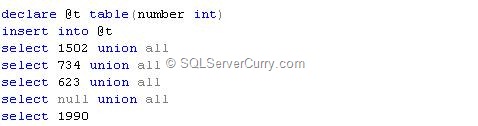
Consider the following table

sql-server-null-sort

Execute the following statement

select number from @t
order by case when number is null then 1 else 0 end, number


The above code sets the serial number based on the ascending order of the values. When the column number is NULL, it sets to 1 otherwise it sets to 0. The second column in the   ORDER BY clause (number) is used to order the numbers in ascending order,  keeping NULL values last.

OUTPUT

sql-server-null-ascending

SQL Server: Move Data to a Different Table using OUTPUT clause

Suppose you want to move some data from one table to another table and then delete the data from source table. In versions prior to SQL Server 2005, this is done in two steps.

1. Copy to target table
2. Delete from source table

In versions from SQL Server 2005/2008 onwards, you can use OUTPUT clause to do this:

Consider the following examples

sql-server-move-table

Now check the output from these tables

select * from @table1
select * from @table2


@table1 has three rows and @table2 has zero rows.

Let us assume that you want to copy data from @table1 where id is 1 or 2, to @table2 and then delete those rows from @table1. You can use the following code:

delete from @table1
output deleted.* into @table2
where cust_id in (1,2)


As soon as rows are deleted from @table1, they are first moved to the DELETED internal table. The code shown above copies this data to @table2

Run the SELECT command again and you can see that the data was moved.

select * from @table1
select * from @table2


sql-server-move-data

SQL Server: Limit Millisecond Part in DateTime2 Datatype

Till version 2005, SQL Server supported only the datetime datatype which stored date and time with milliseconds upto three digits. However SQL Server 2008 supports separate data types DATE and TIME as well DATETIME2 datatype which stores milliseconds upto 7 digits.
 
You can specify the length for DATETIME2 so you can limit the number of digits
displayed for millisecond part.

You can find out the result from the output of the following queries:

select cast(getdate() as datetime2(2))
select cast(getdate() as datetime2(5))
select cast(getdate() as datetime2)

The first query limits milliseconds to 2 digits, second query limits it to 5 digits and last query will show 7 digits, as milliseconds, as no length is specified.

datetime2 millisecond

SQL Server: Last Day Previous Month without DATEADD and DATEDIFF

Suppose you want to find the last day of the previous month, you can always use this method:

select dateadd(month,datediff(month,0,getdate()),0)-1

The above code finds the month difference between 1900-01-01 and current date and adds it to same date, so the result is first day of the month. Adding -1 to this result returns the last day of previous month. This is a very common approach where we use the DATEADD and DATEDIFF functions.

There is another method of finding the Last day of previous month where we will not use the dateadd and datediff functions. Here it goes:

select cast(getdate()-day(getdate()) as date)

The code shown above subtracts DAY from GETDATE(),  so it returns last day of previous month.

Casting it to the DATE data type gives only the date.

OUTPUT
Last Day Previous Month

SQL Server Denali CTP 3 Goodies

Microsoft recently released the SQL Server Denali CTP 3 Product Guide which contains plenty of goodies to help you learn and get up and running before Denali hits the shelves. To help you recollect, it’s been only a month since Denali CTP 3 was released

Microsoft has released datasheets, white papers, technical presentations, demonstrations, hands-on-labs, and useful links to videos that will help you evaluate Microsoft SQL Server code name Denali. This product Guide organizes the content for easier viewing.

Compound Assignment Operators in SQL Server 2008

Compound assignment operators are newly introduced in SQL Server 2008 and the code certainly looks cleaner and easier to type while using them. I am surprised why weren’t they introduced in earlier SQL Server versions at the first place, however now that they are here, let’s quickly learn how to use them:

Observe the following piece of code

SQL Server Compound Assignment Operator

As you can see, we have used a compound assignment operator to simplify the syntax of adding 1 to the existing value of @num and assigning the result to @num. Although this may look as it is not needed, it is extremely useful where you have T-SQL code which does many arithmetic operations on variables.

Here are a couple of other Compound Assignment Operators for your reference:

+=    Add
-=    Subtract
*=    Multiply
/=    Divide
^=    Bitwise XOR
|=    Bitwise OR
%=   Modulo
&=   Bitwise AND

SQL Server: Last BackUp Date

A database developer recently asked me a simple way to find the last backup date of a database. He was using SQL Server 2005. I had written a similar query for the MSDN wiki and here’s the same for my blog readers.

SQL Server Last Backup

During a backup operation, SQL Server 2005 updates the following tables:
  • msdb.dbo.backupfile,
  • msdb.dbo.backupmediaset ,
  • msdb.dbo.backupmediafamily and
  • msdb.dbo.backupset.
In the query shown above, we have made a join between sys.sysdatabase and msdb.dbo.backupset which gets us the database name, the last backup date and who took the backup. sys.sysdatabase is queried as it contains one row for each database in an instance of Microsoft SQL Server.

OUTPUT

SQL Server BackUp

SQL Server Migration Assistant for Denali CTP3


Now if you have a requirement of migrating from your Ms Access database to all higher editions of SQL Server, then here’s some news for you. The SQL Server Migration assistant for Access now supports Denali CTP 3 too.

“SSMA for Access v5.1 is designed to support migration from Microsoft Access 97 and higher to all editions of SQL Server 2005, SQL Server 2008, SQL Server 2008 R2, SQL Server Code Named "Denali", and SQL Azure. Support has been introduced for the recently released SQL Server 2012 codenamed Denali CTP3 too”

SQL Server: Retreive all records between Two Rows of a Table without a Numeric Primary Key

Let us quickly see how to fetch all the records between two rows in a SQL Server table which does not have a numeric primary key.
We will use the Northwind database for our sample and this query has been tested on SQL Server 2005 and 2008.  The table Customer in the Northwind database has a primary key that is non-numeric. So in order to find the rows between position 10 and 20 (ordered by CustomerID), we will use a CTE (Common Table Expression) to do so. Here’s the query:
USE NORTHWIND
GO
DECLARE @Start as smallint = 10;
DECLARE @End as smallint = 20;

WITH CTE AS
(
SELECT ROW_NUMBER() OVER (ORDER BY CustomerID) AS cid,
CustomerID, CompanyName           
FROM Customers
)
SELECT cid as ID, CustomerID,  CompanyName   
FROM CTE
WHERE cid BETWEEN @Start AND @End

OUTPUT

image

LocalDB Denali: New version of SQL Express

Microsoft released LocalDB a couple of weeks ago as part of SQL Denali CTP 3. LocalDB or Local Database Runtime is the new version of SQL Express created specifically for developers. It carries the same features as SQL Express, but in addition, installs faster, has fewer prerequisites, and doesn’t require management of a database instance.

Here are some important points to note about LocalDB:
  • LocalDB does not replace SQL Express, it is an addition to the express family, meant specifically for developers
  • It runs as a separate process, rather than as a service.
  • same memory limitations as Express.
  • uses the same sqlservr.exe as the regular SQL Express and other editions of SQL Server
  • you can create and start a user instance without installing the parent SQL Express instance
  • applications will use the same client-side providers (ADO.NET, ODBC etc) to connect to it
  • multiple LocalDB processes can exists on same machine
  • no database services in LocalDB
  • LocalDB runs in the same security context as the calling application
  • you can attach to database using file location – support for AttachDbFileName property
  • Currently, you must install SQL Server Express Edition in Denali CTP 3 and select LocalDB as a feature. In future, LocalDB may be available as a separate, smaller installer.
  • Currently no support for .NET 4, but planned in future