SQL Server: Removing Deprecated Code and Future Proofing your Queries

New features are added with every release of SQL Server and as a result, some features get removed or deprecated. Deprecated features are features that are still operational (for backward compatibility) but will be removed in a future version. Deprecated features can be of two types: those that will be deprecated in a future version and those that will be deprecated in the next version.

In this article, we will explore how to track deprecated code and correct it. I will also share our observations when we performed the same operation on a live production database. Please feel free to retweet and share this link with fellow developers.

Tracking Deprecated Code in your Database

Tracking deprecated features can help you identify potential future bugs and upgrade and compatibility problems in your database. SQL Server 2008 provides the following methods to detect deprecated code in your database:
  • SQL Server: Deprecated Features performance counter
  • Deprecation category of trace events that includes the Deprecation Announcement and Deprecation Final Support event classes, which can be monitored using SQL Server Profiler or SQL Trace. You can use event notification and track these events via a stored procedure.
  • sqlserver.deprecation_announcement and the sqlserver.deprecation_final_support Extended events
  • Performance Monitor Tool (perfmon.exe) to display the value of counters for SQL Server: deprecated features object.
  • SQL Trace Collector to automate the collection of deprecation events
We will discuss the SQL Server: Deprecated Features performance counter  and PerfMon tool in this article.

Observe the following code which uses the Deprecated Feature performance counter and gives a feel of how the deprecation feature works:

sql deprecated features

OUTPUT

SQL Deprecated Code

The sys.dm_os_performance_counters dynamic management view (DMV) maintains a count every time a deprecated feature is used. The code shown above is for a named instance MSSQL$<instancename>. For a SQL Server default instance, just replace the above code with this one

SELECT
object_name, instance_name, cntr_value
FROM sys.dm_os_performance_counters
WHERE object_name = 'SQLServer:Deprecated Features'
AND cntr_value > 0;


Another way of using this performance counter is by using PerfMon tool (Start > Run > Perfmon) on your machine. For example lets add the sp_dboption counter from the SQLServer:Deprecated Features performance object as shown below.

image

To test the counter, fire the following statement in SSMS which uses the deprecated feature sp_dboption

USE master
EXEC sp_dboption 'Umbra', 'read only', 'FALSE'
GO

image

and note the deviation and counter value when the query is fired. Microsoft recommends to use ALTER DATABASE instead of sp_dboption.

ALTER DATABASE
SET READ_ONLY
GO


It’s always best to log and save your results and the SQL Profiler gives you options to do that.

Note: If you are upgrading your SQL Server 2000 installation to SQL Server 2008, then remember to specifically search for the features that were deprecated in SQL Server 2005, since those features may no more exist in SQL Server 2008. Google/Bing is your friend here and use them to search for removed features. Another way is to look at the Backwards Compatibility section in the SQL server 2005 Books Online Installation guide and remove the deprecated features listed in that section.

What to do once Deprecated Code is detected?

Microsoft has created a page that describes all the deprecated features and has listed alternative techniques to future-proof your code. Although in the beginning of this article, I have shown only a partial screenshot of the deprecated features used in a live production database, we actually encountered over 50 deprecated features that we were using. I have attempted to list some important ones randomly and hope that this list will be useful to you too and would save you time if you were to deal with deprecated code in your database.

Here’s a list of our observations:
  • The COMPUTE or COMPUTE BY syntax is deprecated since it created a new summarized result set which was difficult for apps to consume. Instead now use GROUP BY with ROLLUP which occurs once per compilation.
  • While using locks in SQL Server 2008, although sp_lock and sys.syslockinfo are still available, their use has been deprecated and instead SQL Server favors the Sys.dm_tran_locks.
  • While performing locks use the rowversion data type instead of the timestamp data type
  • The text, ntext, and image data types are being deprecated (since SQL 2005) in favor of varchar(max), nvarchar(max) and varbinary(max) data types.
  • Instead of sp_change_users_login, use ALTER USER WITH LOGIN
  • Compatibility levels 60, 65, and 70 are deprecated and support is provided only for compatibility levels 80 and higher
  • DBCC DBREINDEX has been deprecated and replaced with the ALTER INDEX REBUILD command and DBCC INDEXDEFRAG has been replaced with ALTER INDEX REORGANIZE
  • The sp_depends system stored procedure and the sys.sql_dependencies catalog view have been deprecated. Use sys.dm_sql_referencing_entities and sys.dm_sql_referenced_entities instead
  • Use of WRITETEXT or UPDATETEXT is deprecated when modifying text, ntext, or image data types.
  • In the CREATE FULLTEXT CATALOG arguments, rootpath has been deprecated.
  • Full-Text Search stored procedures are deprecated. Use CREATE FULLTEXT CATALOG, ALTER FULLTEXT CATALOG, and DROP FULLTEXT CATALOG instead
  • If you are using XML, XDR (XML Data Reduced) schemas is deprecated
  • SET SHOWPLAN_ALL and SET SHOWPLAN_TEXT options are deprecated and replaced with the SET SHOWPLAN_XML option
  • SET STATISTICS PROFILE option has been deprecated and replaced with the SET STATISTICS XML option
  • The old syntax of RAISERROR syntax specifying the error number and message number is deprecated (RAISEERROR 50005 ‘Exception Occurred’). Instead use the new syntax RAISEERROR(50005, 10, 1) which allows you to specify the messageid, severity and state)
  • In earlier editions owner.tablename was supported. In SQL 2008, this is deprecated. If an object belongs to a schema, then it must be referenced with its associated schema name so the syntax changes to schemaname.tablename.
  • The sp_attach_db stored procedure has been deprecated and you should use CREATE DATABASE with FOR ATTACH clause
  • sp_addlogin is replaced with CREATE LOGIN. sp_defaultdb, sp_defaultlanguage, sp_password are all replaced with ALTER LOGIN
  • sp_droplogin and sp_revokelogin is replaced with DROP LOGIN
  • sp_adduser, sp_dropuser, sp_grantdbaccess, and sp_revokedbaccess are replaced with CREATE USER, DROP USER and ALTER USER
  • sp_addrole and sp_droprole are replaced with CREATE ROLE and DROP ROLE
  • The ALL clause has been deprecated.
  • Log shipping is deprecated and replaced with Database Mirroring
  • The SQL Server Surface Area Configuration tool is deprecated and replaced with Policy-Based Management.
  • Remote servers will soon be deprecated and you should no longer use sp_addserver, sp_addremotelogin, sp_remoteoption and sp_helpremotelogin. Use Linked server instead.
  • DUMP and LOAD have been replaced with BACKUP and RESTORE
  • sp_helpdevice is replaced by sys.backupdevices catalog view
  • The FASTFIRSTROW table hint is deprecated
  • String literals as column aliases – Microsoft discourages the use of string as a column alias in a SELECT statement as it occurs per compilation. So instead of 'RetValue'= @ret_val, you should use @ret_val as ‘RetValue’
These were just some of the deprecated features we encountered and shared with you. For a detailed list, check this documentation.

Here’s a mantra - Rewrite any pre-written code that uses deprecated features, and avoid using any deprecated features in new development! It will make your life as a database guy, easier.

SQL Server: Handling Divide By Zero Error

Often SQL developers encounter "Divide by zero" error. This is because in an arithmetic
expression, when the divisor is zero (0), the expression throws an error. If you want to simply return NULL instead of an error, you can use one of the following methods

Method 1 : Use CASE expression

declare @var1 int ,@var2 int
select @var1=763, @var2=0

select @var1/case when @var2 =0 then null else @var2 end

OUTPUT

divide_zero3

Method 2 : Use NULLIF function

declare @var1 int ,@var2 int
select @var1=763, @var2=0

select @var1/nullif(@var2,0)

The NULLIF function compares the first parameter (var2) with second parameter (0). If they are same, it returns a NULL

SQL Server: Find Database File Path

Suppose you want to find out the path where the SQL Server database files(mdf and ldf) are located, using a query. You can use system procedure sp_helpdb and system view sysfiles to obtain this information.

The following methods shows the path of the database files for master database

Method 1 : Use sp_helpdb

EXEC sp_helpdb master

db_file
Method 2 : Use sys.sysfiles view

select filename from master.sys.sysfiles

sql-db-filepath

SQL Server: Get Object Last Modified Date

Suppose you want to track when was the last time a particular SQL Server object (table, view, procedure etc) was modified. To do so, you can make use of the system views - sys.objects and sys.all_objects.

Consider this example

create table test(id int, names varchar(100))
GO
select name, create_date, modify_date
from sys.objects
where name='test'


The above gives you the create_date and modify_date (in this case both will be the same).

sql-modify-date

Now alter the table to change the width of the column names

alter table test
alter column names varchar(150)
GO


Now execute the same select statement again:

SQL Server Modified date

Executing the above statement gives you the create_date and modify_date (in this case modify_date will be greater than the create_date). Whenever there is a column change in the table, the modify_date column gets updated.

sql-modify-date-change

Note: You can use sys.all_objects in place of sys.objects too.

SQL Server: Display Query Execution Plans–Different ways

A SQL Server Query execution plan can return detailed information about how the statements are executed. Execution Plans can be viewed in different ways and formats. In this article, we will discuss a couple of options using which you can view the execution plan of a query.

Method 1: Using SQL Server Management Studio (SSMS)

Just highlight a piece of code in SSMS, right click and select ‘Display Estimated Execution Plan’

display estimated execution plan

OUTPUT

display execution plan

Method 2: USE SET statements

You can use SET statements with options like showplan_text, showplan_all, showplan_xml

showplan_text

showplan_text

OUTPUT

showplan_text

showplan_all

Similarly the SHOWPLAN_ALL option displays the same query plan as the SHOWPLAN_TEXT option, but it also provides additional columns of output, for each row of textual output

SET SHOWPLAN_ALL ON;
GO
SELECT *
FROM Production.Product
WHERE ProductID = 526;
GO
SET SHOWPLAN_ALL OFF;
GO


showplan_all

showplan_xml

To view the results in an XML format, use SHOWPLAN_XML

SET SHOWPLAN_XML ON;
GO
SELECT *
FROM Production.Product
WHERE ProductID = 526;
GO
SET SHOWPLAN_XML OFF;
GO


showplan_xml

The result can be huge, so just right click the result > copy and paste in a notepad or XML editor to view the results.

Method 3: Use Plan Cache

You can also use the plan cache to find the execution plan of a query. Use the dm_exec_cached_plans DMV which returns a row for each query plan that is cached by SQL Server for faster query execution.

USE master;
GO
SELECT *
FROM
sys.dm_exec_cached_plans AS cp
CROSS APPLY
sys.dm_exec_text_query_plan(cp.plan_handle, DEFAULT, DEFAULT);
GO


The query above retrieves the plan handles of all query plans in the cache by querying the sys.dm_exec_cached_plans dynamic management view.

sql plan cache

SQL Server: Concatenate Date and Time Column of Character DataType Into DateTime DataType

Suppose you have two columns of character datatype that stores date and time separately and you want to combine both of these columns and convert it to a valid datetime. You can use the following methods:

Consider these variables

Method 1 : Concatenate both strings and convert it into datetime

declare @date char(8), @time char(8)
select @date='20101001',@time ='12:10:47'
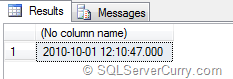
select cast(@date+' '+@time  as datetime)


In the above method both of them are combined to form a datetime and converted to datetime datatype

Concat Char Date and Time

Method 2 : Convert date value into datetime and append time part to it

declare @date char(8), @time char(8)
select @date='20101001',@time ='12:10:47'
select cast(@date as datetime)+@time


In the above method, date value is converted to datetime datatype and time value is
added to it.

Concat Char Date and Time

SQL Server: List all Jobs On Server

SQL Server jobs are used to schedule code to run at periodic intervals automatically. SQL Server agent is responsible for this automation. If you want to list out all the jobs
created in your current server, you can use the following methods

Method 1

Open SQL Server Management Studio (SSMS) > In Object explorer > SQL Server Agent > Jobs

This will show the list of all jobs.

I cannot view SQL Server Agent on my machine?

Here are some reasons why you cannot view SQL server agent on your machine
  • SQL Server agent is not visible if you use SQL Server Management Studio Express since SQL Server Express does not include SQL Server Agent feature.
  • You need to be member of at least one of the SQL Server Agent Fixed Database roles. Remember that members of the sysadmin fixed server role have access to all SQL Server Agent functionality.
Method 2

We can use the system stored procedure sp_help_job available in msdb database
EXEC msdb..sp_help_job

SQL Server Agent Jobs

T-SQL, SQL Administration Articles Link List – August 2011

Here’s a quick wrap up of the articles published on SQLServerCurry.com in the month of August 2011

SQL Server Administration Articles

Every .NET Developer Should Know About the Database they are working with - I am a strong believer that a Developer should understand the databases and network he/she is interacting with. As a .NET Developer, having TSQL and SQL Server Administration knowledge to some degree of depth, really helps to design and develop your applications as well as communicate with the DBAs and admins you work with. In this article, I have attempted to list some articles we have written in the past that will give you information about handling a SQL Server 2005/2008 database.

SQL Server: Last BackUp Date - A database developer recently asked me a simple way to find the last backup date of a database. He was using SQL Server 2005. I had written a similar query for the MSDN wiki and here’s the same for my blog readers

SQL Server Connector for Apache Hadoop - Microsoft has released a new tool/connector based on SQOOP for those looking out to transfer data between SQL Server 2008 R2 and Apache Hadoop

SQL Server: Move Data to a Different Table using OUTPUT clause - Suppose you want to move some data from one table to another table and then delete the data from source table.

T-SQL Articles

SQL Server: Retreive all records between Two Rows of a Table without a Numeric Primary Key - Let us quickly see how to fetch all the records between two rows in a SQL Server table which does not have a numeric primary key.

Compound Assignment Operators in SQL Server 2008 - Compound assignment operators are newly introduced in SQL Server 2008 and the code certainly looks cleaner and easier to type while using them. I am surprised why weren’t they introduced in earlier SQL Server versions at the first place, however now that they are here, let’s quickly learn how to use them

SQL Server: Last Day Previous Month without DATEADD and DATEDIFF - Suppose you want to find the last day of the previous month, you can always use this method

SQL Server: Limit Millisecond Part in DateTime2 Datatype - Till version 2005, SQL Server supported only the datetime datatype which stored date and time with milliseconds upto three digits. However SQL Server 2008 supports separate data types DATE and TIME as well DATETIME2 datatype which stores milliseconds upto 7 digits.

SQL Server: Handle Nulls While Sorting Data in Ascending Order - The SQL Server ORDER BY Clause is used to order the result sets by a set of columns. If you use ORDER BY col ASC, NULL values come first, if you do ORDER BY col DESC, NULL values are shown last, but remaining values are ordered in descending order.However what if you want order the result sets by a particular column in ascending order and also keep all NULL values in last rows?

Other SQL Articles

LocalDB Denali: New version of SQL Express - Microsoft released LocalDB a couple of weeks ago as part of SQL Denali CTP 3. LocalDB or Local Database Runtime is the new version of SQL Express created specifically for developers

SQL Server Denali CTP 3 Goodies - Microsoft recently released the SQL Server Denali CTP 3 Product Guide which contains plenty of goodies to help you learn and get up and running before Denali hits the shelves

SQL Server Migration Assistant for Denali CTP3 - if you have a requirement of migrating from your Ms Access database to all higher editions of SQL Server, then here’s some news for you. The SQL Server Migration assistant for Access now supports Denali CTP 3 too