Find out Long Running query using sp_who2 with Dynamic Management Views‏ (DMV)

There are many ways to find out why your SQL server is performing slow. Suppose you know that your server is responding slowly while executing queries and you want to find out the query that takes a lot of time to execute. If you want to find out slow queries, you can use dynamic management views from version 2005 onwards. However you can still use the old system stored procedure sp_who2 along with management views, to find this info.

Run the following code

EXEC sp_who2

and see the result shown below. Find out rows with runnable status with highest CPUTime.

long_run1

Sp_who2 will not display the text of the query, so we need to find out the text using dm_exec_requests and dm_exec_sql_text management views. The view dm_exec_requests will show the text of the query. All we need to do is to find out spid from the result of sp_who2 and filter it in dm_exec_requests using session_id column. The following code displays the text of the query.

SELECT
        sql.text AS statement_text
FROM
        sys.dm_exec_requests  AS req
CROSS APPLY sys.dm_exec_sql_text(req.sql_handle) as sql
WHERE
    req.session_id=52

Similarly you can also use dynamic management views to find out various root causes for performance issues.

Using sys.dm_os_performance_counters to measure Transactions Per Second

Performance Monitor tool in SQL Server represents aspects of system performance, such as CPU Usage % , Memory Paging etc. The sys.dm_os_performance_counters Dynamic Management View exposes data of all performance counters for the particular instance of SQL Server. This view is extremely useful when you have to present the performance data of your database in your dashboard.

Note: This article has been updated and can be found here http://www.sqlservercurry.com/2013/09/measure-transactions-per-second-in-sql.html

SQL Server 2012 Free Cook Book and Training

Microsoft has created some free content designed to get started with SQL Server 2012.  You can use the SQL Server 2012 Early Adoption Cook Book Wiki at http://social.technet.microsoft.com/wiki/contents/articles/6967.sql-server-2012-early-adoption-cook-book.aspx. You can bookmark this link as Microsoft to update this wiki with the latest SQL Server 2012 information as and when it is available.

Microsoft also released the SQL Server 2012 Developer Training Kit which includes technical content including labs, demos and presentations designed to help you learn how to develop SQL Server 2012 database and BI solutions.

You can download SQL Server 2012 Training Kit over here

Declaring Length for VARCHAR and NVARCHAR datatypes IS Necessary

I have seen some new SQL Server developers declaring Varchar and Nvarchar data types without specifying a length, since it is optional. Although this works in some other programming languages like C#, SQL Server behaves differently and this is a bad practice overall. Let us see with an example of what’s wrong with not declaring a length for the Char or Varchar data type.

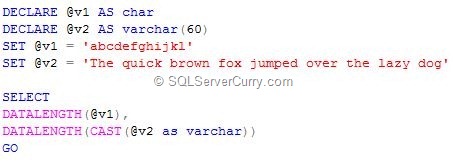
Consider the following t-sql code

varchar-length

OUTPUT

image

Surprised seeing the output? When a length is not specified while declaring a variable, the default length is 1 and when a length is not specified when using the CAST and CONVERT functions, the default length is 30. That’s the reason you get the output you see above.

Note: Try doing the same when you create a table with a CHAR column, without specifying the length.

To get the desired results, rewrite the t-sql code in the following manner:

DECLARE @v1 AS char(30)
DECLARE @v2 AS varchar(60)
SET @v1 = 'abcdefghijkl'
SET @v2 = 'The quick brown fox jumped over the lazy dog'

SELECT
DATALENGTH(@v2),
DATALENGTH(CAST(@v2 as varchar(60)))
GO


Now you get the desired results

image

Another place where you got to be careful is while creating stored procedures with parameters. If you have created a stored procedure that accepts a parameter with a VARCHAR datatype with no length, you will be in for a surprise to learn that SQL Server silently truncates the string and adds some leading characters.

Overall, always specify a length for the CHAR, VARCHAR, NVARCHAR and similar data types. It’s a good practice!

Restoring SQL Server Database: Points to Consider

Here are some important points to consider while restoring a database backup. Let us first create a sample database named test using the following code

sql-restore

A new database named test will be created in your server and data and log files are created in the H: drive.

Let us assume that you regularly take backup of this database using the below code:

backup database test to disk='h:\test.bak'

Now if you want to create another database or restore this test database to a new database named testing, you can use the following code

restore database testing from disk='h:\test.bak'

However executing the code above will give you the following error

Msg 1834, Level 16, State 1, Line 2
The file 'h:\test_dat.mdf' cannot be overwritten.  It is being used by database 'test'.
Msg 3156, Level 16, State 4, Line 2
File 'test_dat' cannot be restored to 'h:\test_dat.mdf'. Use WITH MOVE to identify a valid location for the file.
Msg 1834, Level 16, State 1, Line 2
The file 'h:\test_log.ldf' cannot be overwritten.  It is being used by database 'test'.
Msg 3156, Level 16, State 4, Line 2
File 'test_log' cannot be restored to 'h:\test_log.ldf'. Use WITH MOVE to identify a valid location for the file.
Msg 3119, Level 16, State 1, Line 2
Problems were identified while planning for the RESTORE statement. Previous messages provide details.
Msg 3013, Level 16, State 1, Line 2
RESTORE DATABASE is terminating abnormally.


This error occurs because the data and log files are currently being used by the database test. So you need to give different names for those files while restoring, as shown below

restore database testing from disk='h:\test.bak'
with
move 'test_dat' to 'h:\testing.mdf',
move 'test_log' to 'h:\testing.ldf'


The above code will work fine and new database will be created with the name testing.

Just be aware of this point while restoring a backup of existing database!

Most Popular SQL Server Articles in 2011

With 2012 fast approaching and 2011 drawing to an end, we've put together our list of the Most Popular SQL Server articles on SQLServerCurry.com this year.

I would like to thank each one of you who has visited my blog or contributed to it by submitting a Guest post, Subscribing to RSS Feed, by joining me on Twitter, retweeting posts or promoting the articles and giving regular feedbacks via rating, comments or Emails. A special note of thanks to Madhivannan and Pravin Kumar for their contributions.

Here are some articles that were liked the most by readers like you. Have a very Happy New Year 2012!

SQL Server Administration Articles


T-SQL Articles

Assign Result of Dynamic SQL to a Variable in SQL Server

Suppose you have dynamic sql that returns a single value and you want to copy it to a variable. For eg: you want the total count of the table copied to a variable. This is possible in SQL Server using the following methods:

Method 1 : Use sp_executesql system stored procedure

declare @counting int
execute sp_executesql
          N'select @count=count(*) from sys.objects',
          N'@count int output',
          @count =@counting output;
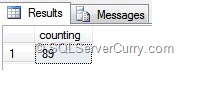
select @counting as counting


In the above method, count is assigned to the variable @count which outputs to @counting

Method 2 : Use table variable

declare @t table(counting int)
declare @counting int
insert into @t
exec('select count(*) from sys.objects')
select @counting=counting from @t
select @counting as counting


The above t-sql code copiesthe  resultset to table variable @t and the count is copied to variable @counting

OUTPUT

dynamic-sql-variable

Why is RAID So Important for Databases?

A good server design has no, or very few, single points of failure. One of the most common server component that fails, are disks. So data redundancy becomes essential to recoverability. Redundant Array of Independent/Inexpensive Disks (RAID) is a disk system that provides better fault-tolerance by making use of redundancy of disk(s).

Read the entire updated article here

Deleting Leading Zeros in a String (SQL)

A common issue while importing data from different source into SQL Server is often numbers get prefixed with zeroes. If you want to delete these leading zeroes in a string, you can use the following methods:

Method 1 : CAST to Bigint

declare @s varchar(100)
set @s ='0000004007340007402100'
select cast(@s as bigint)


CASTing the string to Bigint will automatically delete the leading zeroes

sql-delete-zeroes

Method 2 : Use Replace function

declare @s varchar(100)
set @s ='0000004007340007402100'
select replace(ltrim(replace(@s,'0',' ')),' ','0')


The T-SQL code shown above first replaces all zeroes to a single space. The LTRIM function deletes all leading spaces and the second replace function, replaces all spaces to zeroes, so that all leading zeroes are deleted.

OUTPUT

sql-delete-zeroes

Find Last Run Query in SQL Server

Have you ever wondered what SQL query was last executed by your users across all SQL Server databases on your server? I have seen some solutions on the internet that use the sysprocesses view to retrieve this information. In this post, I will show you how this information can be retrieved better using Dynamic Management Views.

Please use this query:

SELECT conn.session_id, sson.host_name, sson.login_name, 
 sqltxt.text, sson.login_time,  sson.status
FROM sys.dm_exec_connections conn
INNER JOIN sys.dm_exec_sessions sson 
ON conn.session_id = sson.session_id
CROSS APPLY sys.dm_exec_sql_text(most_recent_sql_handle) AS sqltxt
ORDER BY conn.session_id

Here I have utilized the sys.dm_exec_connections Dynamic Management View, in conjunction with the sys.dm_exec_sessions DMV and sys.dm_exec_sql_text Dynamic Management Function (DMF) to return the last query executed against all SQL Server databases, in that server.

Here’s a quick overview of what these DMV’s and DMF do
sys.dm_exec_connections - Returns information about the connections established to this instance of SQL Server and the details of each connection

sys.dm_exec_sessions - Returns one row per authenticated session on SQL Server. sys.dm_exec_sessions is a server-scope view that shows information about all active user connections and internal tasks. This information includes client version, client program name, client login time, login user, current session setting, and more

sys.dm_exec_sql_text - Returns the text of the SQL batch that is identified by the specified sql_handle

In the last statement, we are passing the value contained in the most_recent_sql_handle column of this DMV to the sys.dm_exec_sql_text DMF.  The DMF returns the text of the sql query, whose sql_handle we passed to it.  This sql_handle that we passed, uniquely identifies the query.

Here’s the output

sql-last-run-query